Opportunity Goals - Campaign/Service Breakdown Tab
The Campaign/Service Breakdown tab is used to review the number of sales campaign prospects and service traffic prospects added during the selected time frame.

|
To access the Campaign/Service Breakdown tab, click the |
 (Campaign/Service Breakdown) icon on the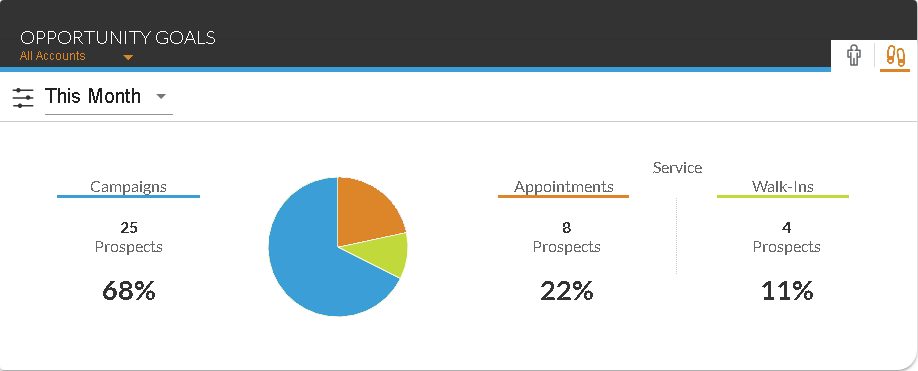
The unlabeled Opportunity Goals graph displays the percentage of prospects added from sales campaigns and the service department during the selected time frame. The time frame for which information displays on this tab can be changed using the unlabeled Time Frame field.
The following columns display on the Campaign/Service Breakdown tab.
Campaigns: The number of prospects added from sales campaigns during the selected time frame displays. The percentage of the total number of prospects that were added as a result of sales campaigns also displays.
Appointments: The number of prospects added from service appointments during the selected time frame displays. The percentage of the total number of prospects that were added as a result of service appointments also displays.
Walk-Ins: The number of prospects without appointments added during the selected time frame displays. The percentage of the total number of prospects that were added as a result of service walk-ins also displays.
Click here for a list of products that may be mentioned in this help file.